> For the complete documentation index, see [llms.txt](https://helpdocs.conducttr.com/llms.txt). Markdown versions of documentation pages are available by appending `.md` to page URLs; this page is available as [Markdown](https://helpdocs.conducttr.com/feature-documentation/designing-and-running/master-events-list/questions-and-data-points.md).
# Questions & Data Points
Questions in Conducttr allow designers to incorporate **quantitative data points** into crisis exercises. This enables **automated assessment of player decisions and understanding**. Designers can choose from several question types.
## When to Use
Use questions when you need to:
* Evaluate player decision-making or understanding
* Collect structured data points for analysis during and after an exercise
## How to
### Implementation
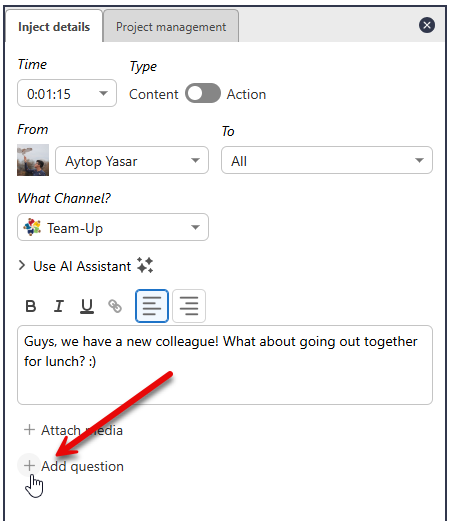
To create a question and subsequent data point in an exercise, click `Add question` when creating an inject.
You can choose how the player answers this question from a drop-down menu:
### Configuration
When you add a question to an inject, a data point is automatically created.
{% stepper %}
{% step %}
### Rename the data point
Assign a meaningful name to the data point to ensure clarity in the reporting phase.
{% endstep %}
{% step %}
### (Optional) Add discussion notes
It's best practice to write what is expected from the player, e.g. usually what the correct answer is. This information will be displayed to the Facilitator next to the question results.
{% endstep %}
{% step %}
### Select the question type
* **Open Text**: Enable players to respond with free-form text
* **Choice**: Allow players to select one option from a list
* **Arrange**: Enable players to rank choices in order of preference
* **Drop-down**: Provide a drop-down list for players to select a single option
* **Multiselect**: Let players select multiple options
{% endstep %}
{% step %}
### Decide if you'd like an automated reply
Automated replies are sent immediately after the player submits their answer. Replies are from the same persona who has sent the message.
You can write a single reply for all answers or a different reply depending on the choice.
{% endstep %}
{% step %}
### (Optional) Move to Role or Group
You can decide if a certain answer will move a player into a Group or Role. Note that Group 1 and Role 1 are default Group and Role for players if you haven't assigned in the Teams table or anywhere else.
The purpose of moving to a Group or Role is to allow you show the player that their choices have consequences (even if slight consequences). Later in the exercise e.g. you can publish content to a specific Group or Role.
{% endstep %}
{% endstepper %}
### Styling
The colour of buttons and answer options can be styled for the exercise in `Configuration` > `Player Desktop` > `Content and questions` .
### Real-time insights
Real-time data points from questions are displayed in the `Review` tab in the **Facilitator Dashboard**, provided this option is enabled by the designer:
* **Timeline**: Shows the time each question was answered
* **Data Point**: Displays the chosen answer
Answers are displayed by Team and by individual. This enables an aggregate view while also showing individual answers.
### :star:Best Practices
* Use **simple, concise language** for questions to avoid confusion and taking too long to read
* Clearly define correct and incorrect options where applicable for **post-exercise evaluation**
* For Open Text questions, **provide guidance** on the expected response length and tone
* Ensure data point names are descriptive and **relevant to improve comprehension in reports**
* **Pre-test the questions** with a limited audience to refine wording and option clarity
---
# Agent Instructions
This documentation is published with GitBook. GitBook is the documentation platform designed so that both humans and AI agents can read, navigate, and reason over technical content effectively. Learn more at gitbook.com.
## Querying This Documentation
If you need additional information that is not directly available in this page, you can query the documentation dynamically by asking a question.
Perform an HTTP GET request on the current page URL with the `ask` query parameter, and the optional `goal` query parameter:
```
GET https://helpdocs.conducttr.com/feature-documentation/designing-and-running/master-events-list/questions-and-data-points.md?ask=&goal=
```
`ask` is the immediate question: it should be specific, self-contained, and written in natural language.
`goal` is optional and describes the broader end goal you are ultimately trying to accomplish on behalf of the user. GitBook uses it to tailor the answer towards what is most useful for that goal.
The response will contain a direct answer to the question and relevant excerpts and sources from the documentation.
Use this mechanism when the answer is not explicitly present in the current page, you need clarification or additional context, or you want to retrieve related documentation sections.