memo-padPattern of Life (PoL)

Pattern of Life (PoL ) is a predefined pool of content used to simulate audiences, mirroring the rhythm of real online activity.

PoL content is published in the same channels as scripted content from the Master Events List (MEL). The key difference is that PoL content is designed for dynamic publishing by the Facilitator. PoL allows the Facilitator to publish content "on-demand" rather than in sequence as is the case with the MEL.

This combination of scripted injects from the MEL and on-demand message stacks from PoL provide the player with a blended content experience within their Virtual Desktop, which feels realistic and engaging.

Why use Pattern of Life?

Benefit
Description

Efficiency

Automates persona behaviour, reducing manual effort during the exercise

Realism

Personas behave like real individuals. A good example is if you want to stimulate multiple tweets seconds apart from each other

Engagement

Adds depth to the exercise by ensuring that players are receiving content from personas that feel real

Terminology

Term
Definition

Deck

The place where stax are stored (up to 64 spaces available)

Stack/Stax

The folders or buttons that contain a sequence of posts within one channel.

Post

An individual item within a stack e.g. a tweet

Running

In the Facilitator Dashboard you can view the deck by clicking the PoL tab located at the top of the dashboard. On the deck there are two modes:

  1. Play mode

  2. Edit mode

Play mode

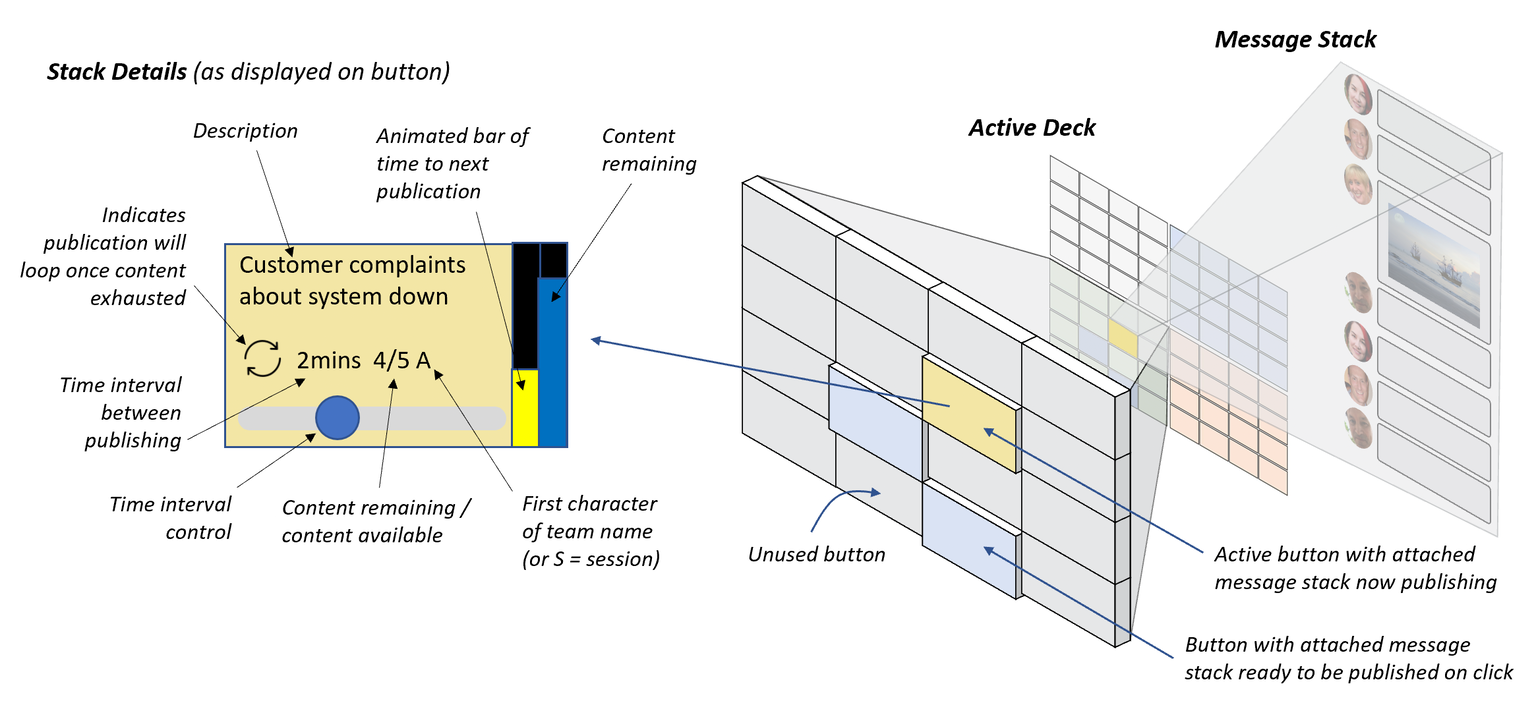
The deck will automatically be on 'play mode'. This allows the Facilitator to publish the stacks, turning them on and off independently. All available stax are low-lighted. When the Facilitator presses a button, the activation is shown as a highlighted yellow button.

Each button displays the following information:

Edit mode

Edit mode allows the Facilitator to modify some settings for each stax:

  • Loop: Stax will repeat once completed

  • Session: Decide if everyone in the session will see the content or a specific team

  • Number: Determines where your content will start. E.g. if it's set to 1, the first piece of content in your stack will be sent. Alternatively, if it's set to 3, the third piece of content will be sent.


Designing

How to

1

Click a deck button - this will create a stack waiting for content.

Click the AI magic icon

2

Use the AI Stack Assistant

The AI Stack Assistant generates a flow of reactions and chatter across multiple posts.

The Stack Assistant expects you to select:

  • Faction

  • Channel

  • Faction beliefs (positive, negative, or mixed)

circle-exclamation
3

Generate a Preview and then Generate Stack

Use the "Get preview" button to see a sample of content the AI will generate. If you like it, click Generate Stack. If you don't like the sample, change the text in the Point of view field or the Faction voice or the description in the Exercise Setup.

How Pattern of Life works

Stax can be started automatically from the MEL using an Action inject or "live" during an exercise by the Facilitator.

circle-info

To learn more about running PoL manually during an exercise, please visit the page below:

How to configure an Action inject for PoL

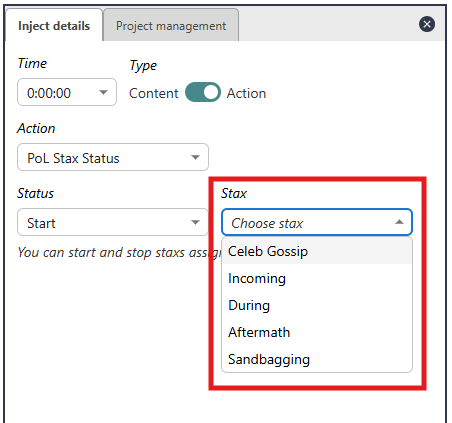
1

Select Action

Create a new inject and in Inject details, select Action. Then in the Action drop-down menu that appears, select PoL Stax Status.

2

Select Status

In the Status dropdown menu that appears, select either Start or Stop depending on whether you're looking to start a stack or stop one.

3

Select Stax

From the Stax dropdown menu that appears, select the stack you want to stop or start.

Decks

Designers can create multiple decks, but only one deck can be active at any time.

Mixing Channels in a stack

It is possible to mix social channels in the same stack but we don't recommend it.

Why? Because when you're running an exercise it's easy to forget that the content is published across multiple channels and you may watch the stack timer expire only to wonder where your content has been published!

Email stax

Email can't be combined with other channels in the same Stack. This is because email isn't a feed in the way that social media is.

Last updated

Was this helpful?