February 2026
February 14th, 2026
What’s in This Release
This release introduces two key enhancements: a revamped Log Channel, designed to improve collaboration during live exercises, and the return of the ability to export and import Styles in the Exercise Editor, making it easier to reuse visual presets across scenarios.
It also includes additional improvements across the Editor and Communicator, as well as a number of bug fixes.
Improvements to Existing Features
Log Channel Overhaul
What’s New
The Log Channel has been redesigned and enhanced to become a more dynamic channel that supports collaboration rather than only static logging. The new features include:
Search & Find
Content Creation
Team Collaboration
Search bar
Rich text formatting (bold, italics, lists, colours, alignment, hyperlinks)
Ability to comment on logs
Filter by player
Table creation inside logs
Ability to re-edit your own logs
Bookmark and pin important logs
⚙ How It Works
Click New Entry.
Format your content using the new toolbar options.
Use search and filters to quickly find specific entries.
Bookmark key logs to pin them to the top.
Comment on logs to provide feedback.
Edit your own logs - updates are marked as “Edited” and reflected across Review, Report, and Pulse automatically.
Note: entries cannot be deleted.

Use Case Example
During a live cyber exercise, a participant logs a situation update using bullet points and highlighted text to outline risks.
Another participant bookmarks the update, adds a comment for clarification, and later filters logs by that specific player to assess decision-making. All edits are automatically reflected in the Review tab and final report.
Export/Import Style
You can now export and import Styles in the Exercise Editor. Using popular styles across exercises reduces production time and brings consistency where required.
Important notes:
Configuration settings are not included in the Style export - only visual style elements are transferred.
The Diagrams channel is scenario-specific and is not included in the export.
Phonecall channel style is included when exporting or importing a Style.
Other improvements
Duplicate Stax in one click
A duplicate icon has been added to Stax, allowing you to quickly copy a Stax into a new tab. The duplicated version is automatically renamed with a number suffix (e.g., “(1)”), making it easy to iterate without manual setup.
Player profile images now supported in Teams table
You can now upload and manage player profile images directly within the Teams table in the Exercise Editor. If a player later changes their image in Communicator, and the Teams list is re-uploaded, the system will revert the image to the one defined in the Teams table. Additionally, you can restrict players from changing their images via registration settings.
Crop website header images directly in the Editor
Website header images can now be cropped directly inside the Exercise Editor when editing website styles, no need to do this externally.
More control over Facilitator Dashboard tabs
You can now hide additional facilitator tabs options that are not required for your exercise.
Reset persona location to default
You can now remove or reset a persona’s location back to its default setting, giving more flexibility when editing profiles.
Do not refresh your browser during uploads
New and improved alerts provide better feedback during actions such as uploading Teams. For example, designers are now warned not to refresh the screen during the upload process.
Reports now enabled by default
Facilitator reports are now automatically activated. Previously, designers had to manually enable reporting, this is now visible and active by default.
Bug fixes
Various bugs have been resolved across the platform to improve stability and overall user experience.
February 7th, 2026
What’s in This Release
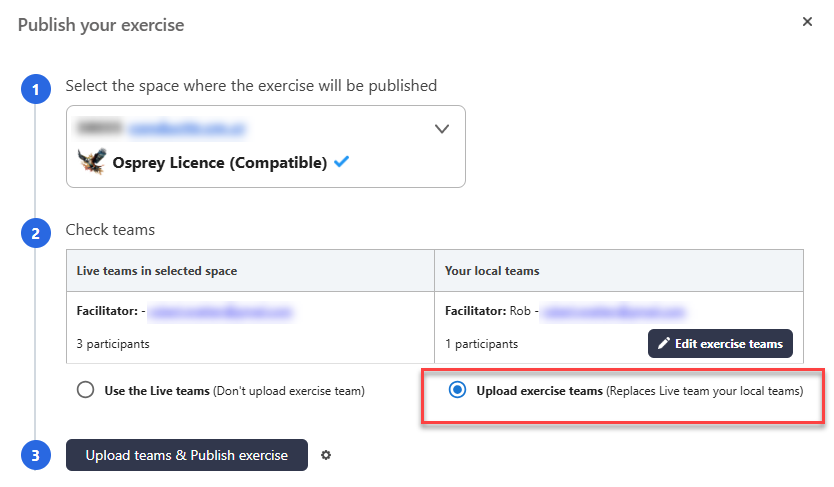
This release requires everyone to republish their exercises and teams. This to ensure your exercises continue to run correctly following the platform updates.
In addition, we’ve rolled out performance improvements and system hardening, addressing recent issues related to video processing, exercise speed, and duplicate injects.
Republish your exercise needed
Please republish your exercise and teams - see the image below for the correct option. This is necessary even if it hasn't changed. While your exercises in the Editor are unchanged, the simulation spaces need refreshing.

Performance Improvements
We've upgraded the system to a bigger platform and implemented rate limits on video processing. We have experienced issues recently with increased volumes of videos uploaded and in some cases it resulted in slow-running exercises. This should no longer be the case.
Inject duplication issue mitigations
Some clients have experienced duplicate injects being published. This is due to team upload issues which we have hardened to better detect issues if connection between the Editor and the simulation space falters.
Please refresh your browser tab where you have the Editor loaded so that it downloads the new code.
There will be additional improvements to this on the next update Feb 14th
Last updated
Was this helpful?