> For the complete documentation index, see [llms.txt](https://helpdocs.conducttr.com/llms.txt). Markdown versions of documentation pages are available by appending `.md` to page URLs; this page is available as [Markdown](https://helpdocs.conducttr.com/feature-documentation/designing-and-running/channels/exercise-logging-channels/log.md).
# Log
The Log channel is a team-based channel where players can **record their key decisions** and allow others to comment on those logs.
| Benefit | Feature |
| ----------------------------------------------------- | ------------------------------------------------------------------------------------------------------------------------------------------------------------------------------- |
| Establish an official record of the crisis response |
Dedicated channel for recording key events, decisions, and actions during the exercise
Chronological record that reflects how the situation developed
|
| Support the role of the crisis log keeper |
Players can formally record decisions, actions, and issues as they occur
Each entry automatically captures date and time
|
| Maintain shared situational awareness across the team |
Logged entries are visible to other participants
Issues and updates can be recorded and tracked as the situation evolves
|
| Capture the rationale behind decisions |
Attach documents, screenshots, or evidence to log entries to preserve supporting information linked to specific decisions
|
| Enable structured post-exercise review |
Facilitators can review how the team responded and how decisions were made
|
## Running
To create a new Log entry click `New entry`:
{% hint style="info" %}
The Log channel saves details such as time and date of each entry, allowing you to view when decisions were made or when issues were reported.
{% endhint %}
Once you click the pencil icon the Log entry window will appear. Here you can edit the formatting of the text with the options (**bold**, *italics*, ~~strikethrough~~ etc.) highlighted in the screenshot below:
### Creating tables
You can also create tables in Log entries to clearly organise information.
### Comments, edits and bookmarks
#### Comment
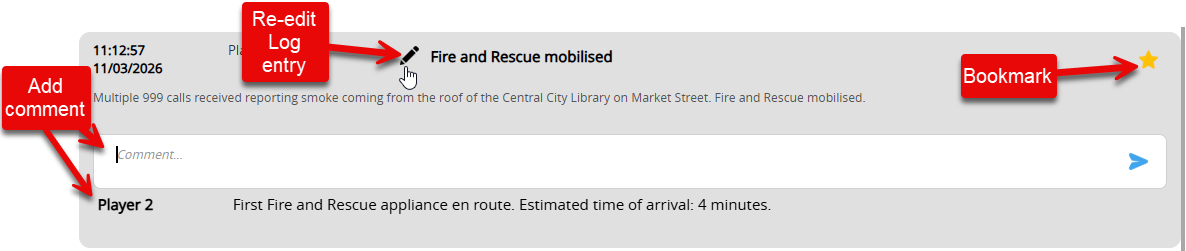
Click on a Log entry to expand it and add a comment in the text box as shown above.
#### Edit
If you need to edit a Log entry, click the :pencil2: pencil icon next to the Log entry subject. This will allow you to re-enter the Log entry window and make any necessary changes. Remember to click `Save`.
{% hint style="warning" %}
Participants can only edit their own Log entries.
{% endhint %}
#### Bookmark
Check the :star: star symbol to bookmark a Log entry. This will move the Log entry to the top of the list.
### Search and filter
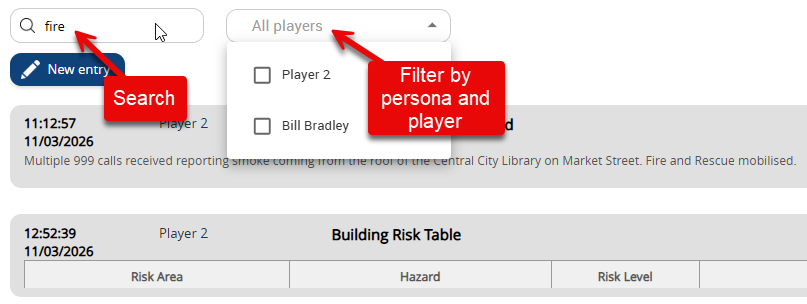
Look for specific words and phrases throughout the Log channel via the search bar and filter Log entries by persona or player:
***
## Designing
### How to (Injects)
To **activate the Log channel, you must send an inciting inject** to the players via the Master Events List (MEL) in your Editor.
The text entered in the subject and body of the inject will appear as the heading and main body of the Log entry for players, making it a good place to provide prompts or instructions on what you want them to record:
{% hint style="success" %}
Use the **Log 2 channel simultaneously to have separate logs** for different subjects/departments/uses within an exercise.
{% endhint %}
---
# Agent Instructions
This documentation is published with GitBook. GitBook is the documentation platform designed so that both humans and AI agents can read, navigate, and reason over technical content effectively. Learn more at gitbook.com.
## Querying This Documentation
If you need additional information that is not directly available in this page, you can query the documentation by asking a question.
Perform an HTTP GET request on the following URL with the `ask` and `goal` query parameters:
```
GET https://helpdocs.conducttr.com/feature-documentation/designing-and-running/channels/exercise-logging-channels/log.md?ask=&goal=
```
`ask` is the immediate question: it should be specific, self-contained, and written in natural language.
`goal` is what the user is ultimately trying to achieve, the reason they need the answer. Sharing it helps GitBook give you a better, more relevant answer. A goal is most helpful when it describes the outcome the user wants rather than restating the question. For example, with `ask=how do I create an API token`, a goal like `automate deployments from our CI pipeline` lets GitBook tailor the answer to that use case.
The response will contain a direct answer to the question and relevant excerpts and sources from the documentation.
Use this mechanism when the answer is not explicitly present in the current page, you need clarification or additional context, or you want to retrieve related documentation sections.